Soda Studio  PRO
PRO
Build the whole scene: several characters, swords and chairs pinned to their hands, a real light with shadows, any camera angle.
Open Soda Studio →
SODA BODY Pro
Layered files for Procreate and Photoshop, timed pose sessions and anime mannequins — on top of everything that's already free.
By subscribing you agree to the Terms and Privacy policy. 7-day refund on any first payment — Refund policy.

Yearly is the smart one.
 Clip Studio Paint
 KritaAffinity
 Photopea
 MediBang PaintIbis Paint
SODA BODY exports standard PNG and PSD files that open in these apps; it isn't affiliated with or endorsed by them. Procreate® is a registered trademark of Savage Interactive Pty Ltd. Photoshop is a trademark of Adobe. Clip Studio Paint logo: image provided by Celsys. Affinity is a trademark of Canva. All other trademarks belong to their owners.
Recorded on the real site — this is exactly what you get.
PROBuild the whole scene: several characters, swords and chairs pinned to their hands, a real light with shadows, any camera angle.
Open Soda Studio → PROThe same frame as image, lines, depth, normal map and OpenPose skeleton — for drawing apps and AI tools.
Open Soda Studio → PROProcreate, Photoshop, Clip Studio or Krita: mannequin, muscles, guides and paper on their own layers.
Open Soda Poses → PROCollect poses into a set, pick 30 s to 5 min, and draw them one after another against the clock.
Open Soda Poses → PROThe anime body in 3D with skin and ball joints, plus the expression library to study faces.
See the expressions →
Hover the body in 2D or 3D, click a part, get its construction, landmarks and a dozen ways to draw it.

Peel every reference from finished drawing to muscles, basic forms and gesture.

Full-screen reference with flip, grid and timer — or a layered PSD straight into your app.

Build a set of poses and draw them against the clock. 30 seconds to 5 minutes each.

Draw next to the reference, then lay it over your lines in red to see what drifted.
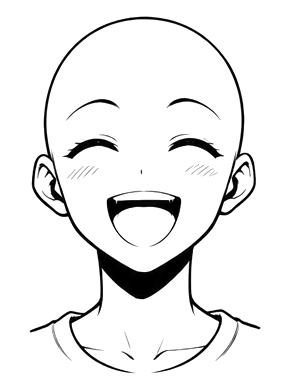
Loose anime mannequins in ten poses, plus an expression library to study faces.
Press “Start free trial” and every Pro feature unlocks right away for 7 days — no card. When it ends, the free parts keep working and Pro waits for a plan.
Yes. Export a layered PSD from any reference (or from your own drawing) and open it in Procreate: you get the final drawing, muscles, skeleton, forms and gesture as separate layers, plus an empty layer on top to draw on. On iPad you can also send a PNG through the share sheet or drag it into Procreate in Split View.
The PSD opens with its layers in Photoshop, Clip Studio Paint, Krita, Affinity, Photopea, MediBang Paint and Ibis Paint. PNGs work everywhere — or print them and draw on paper.
Yes — it runs in Safari, Draw mode supports Apple Pencil pressure, and references go full screen for a second screen or split view.
Monthly and yearly plans cancel any time from your account (Manage or cancel); you keep Pro until the period ends. Lifetime is a one-off payment. Any first payment can be refunded within 7 days.
Yes — draw from them, trace them for practice and post what you make. Please don't resell the references themselves.